Chrome Extension • Personal Project
finishedSnaPT
Designing around friction in AI workflows
- Role
- Builder, UX Engineer
- Team
- 1 person
- Timeline
- Weekend in April 2026
- Skills
- Browser engineering
- Interaction design
- Prompt-assisted coding
- Privacy / store-readiness
Overview
SnaPT is a project born out of personal frustration. The longer I used ChatGPT for real work, the more obvious a specific issue became: the interface got slow and laggy right as the conversation became richer in context and history.
While fresh chats felt snappy, long working threads with multiple exchanges lagged and chugged along in a way that was not becoming of a $852 billion valuation firm.
This issue annoyed me enough that, over a weekend in April, I decided to solve it myself.
What started as a performance fix quickly turned into a broader systems and product problem involving systems design, performance optimization, interaction design, prototyping, privacy constraints, and the quagmire of getting something onto the Chrome Web Store.
Problem & Motivation
The cause of this issue comes down to how the browser renders threads. Long ChatGPT conversations accumulate state. More messages mean more DOM nodes, with DOM standing for Document Object Model, the browser's internal representation of everything visible on the page. They also mean heavier payloads and more for the browser to process and maintain.
What that looks like in practice is typing lag, sluggish scrolling, and slower response rendering. The interface gets heavier as the conversation gets longer. This is not really a device issue either. It happens whether you are running ChatGPT on a souped-up RTX 5090 desktop or on a potato.

A long thread, with older turns pushed out of the live surface.
The obvious solution sounds simple: just start a new chat. The problem is that doing that means abandoning context, which defeats the entire point of using ChatGPT as a running work surface for projects that actually depend on that context. The more useful the conversation becomes, the worse the tool gets at supporting it.
While trying to understand why this lag happened, I found an existing extension that addressed the issue. Unfortunately, after a 7-day free trial, it asked for money. That was the point where I stopped looking for a solution and decided to build one myself. With AI coding tools and my own experience building things, the project stopped being a complaint and became a reverse-engineering exercise.
Design Requirements
The scope of this project was to make long reasoning threads usable again without throwing away the context that made them valuable in the first place.
Any workable solution had to satisfy four conditions:
- -reduce the amount of conversation state the live thread had to carry
- -preserve the recent working context
- -keep older history recoverable on demand
- -maintain enough conversational continuity that the chat still felt alive
Research
I started by trying to understand where the slowdown was actually coming from, because that would decide what kind of solution was even worth building.
There were two real approaches to investigate. The first was hiding already rendered content from the DOM. The second was reducing what the page had to render in the first place by intercepting conversation data before it reached the browser.
On the surface, those approaches looked pretty similar. In practice, they behaved very differently.
DOM-only hiding reduced visual clutter, but render times stayed the same and the lag while typing remained.
Pre-render trimming, intercepting ChatGPT's conversation JSON responses and stripping older turns before the page processed them, produced a genuinely lighter working set. That made it clear that this was the solution space worth building in.
Exploring the Solution Space
Once that distinction was clear, the solution space narrowed quickly. DOM-only trimming stayed in the build as a fallback because it was simple and visually useful, but it did not meaningfully improve performance.
Pre-render payload trimming became the real direction.
That choice only worked with cached retrieval. Trimming older turns without a way to bring them back would have meant losing context, which would have solved the lag while damaging the product experience.
Cached recovery made aggressive trimming viable while still letting users pull older turns back on demand.
Once this architecture was in place, the problem shifted from figuring out the architecture to balancing the compromises: how much to trim, how much recent context to preserve, and how to keep the extension fast without killing the flow of the chats and omitting too much.
Prototyping and Testing
By this point, with the architecture locked in, the work shifted to iterating on the experience until it felt like something worth releasing. Some versions improved performance but made the conversation feel dead. Some preserved more context but brought the lag back. Some fixed a local problem and created a worse one somewhere else.
Phase 1: Make the extension real
The first hurdle was getting a local extension to reliably attach to ChatGPT conversation pages and do anything useful. This phase established that the problem was real, that the extension needed better observability, and that shallow fixes would not be enough.
Phase 2: Find the real performance lever
Early DOM-only trimming made the page look cleaner but barely changed the experience. The breakthrough came from trimming the conversation payload before the page rendered it. The difference was not subtle. DOM-trimmed versions changed the page. Payload-trimmed versions changed the feel.
Phase 3: Fix the mental model
Once pre-render trimming worked, the next problem was semantics. Counting visible messages as turns made the feature behave in ways that did not match how users think about conversations. Switching to user-anchored grouped turns, one user message plus all following assistant content until the next user message, fixed the logic. It also rippled through every part of the extension: keep counts, trim thresholds, load-previous behavior, cached counts, and the top bar numbers all had to be rebuilt around the new unit.
Phase 4: Make recovery and recent context usable
Older turns needed to come back as readable conversation, not as a dump of fragments. Early cached-history versions failed exactly that test. At the same time, aggressive trimming made the live thread feel too compressed. This phase was about making cached retrieval coherent and figuring out how much recent assistant activity to preserve in the live view without reintroducing lag. Getting thinking blocks right was the hardest part of this phase. Some versions dropped them entirely. Some surfaced only timer stubs like 'Thought for 1m 23s' because the cleanup logic caught simple duration formats but missed longer ones. The fix was treating thinking as structured assistant-side content inside a turn rather than whatever matched a text pattern.
Phase 5: Turn it into a product
DThe later iterations focused on fit and finish. The popup moved away from a dev-utility aesthetic toward a calmer, cleaner surface with advanced options tucked behind a disclosure. Several technically valid but experientially wrong ideas got cut. The clearest example was a version that fixed a cached panel layout issue by turning it into a bounded internal scroll widget with its own nested control bar. It solved the local problem and made the extension feel like a mini-app bolted inside ChatGPT. It got pulled immediately. By the end of this phase, the extension had finally started feeling like a shippable product.
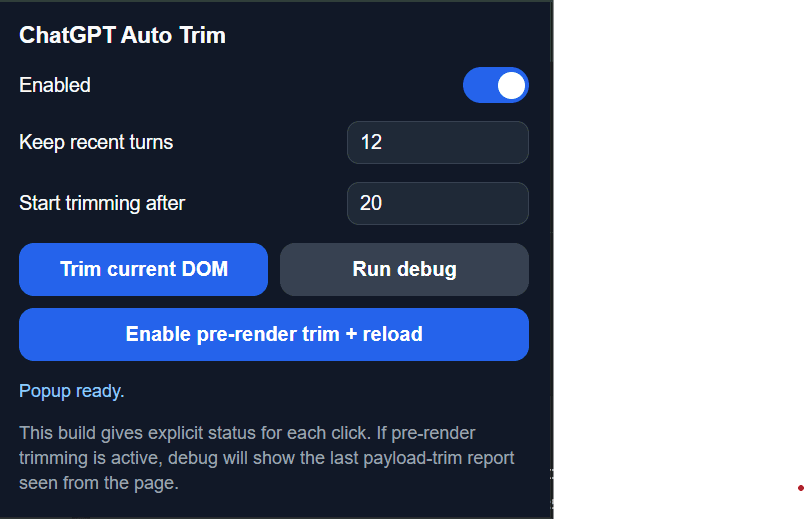
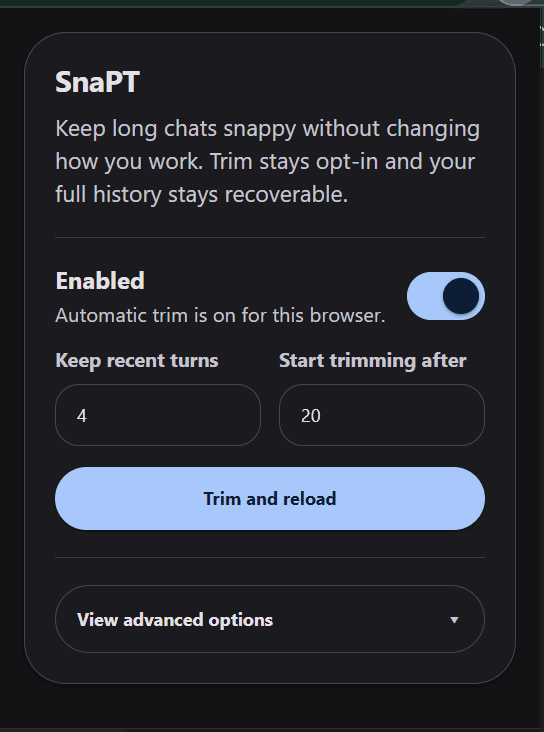
The popup went from debug-heavy utility to a narrower, more trustable control surface.
The Actual Solution
SnaPT is built around one core idea: reduce what the page has to carry in the live thread without throwing away the value of the conversation.
For the user, the experience is simple. They open the popup, decide how many recent turns should stay live, choose when trimming should begin, and reload the thread. After that, the extension gets out of the way. The recent working context stays visible, the older turns move into a recoverable cache, and the chat just feels lighter and responsive.

SnaPT trims the live working set and moves older turns into a recoverable layer.
The core mechanism is trimming conversational nodes and caching them for later viewing. The extension intercepts ChatGPT's conversation JSON response and strips older turns before the browser has to process and render them. Once the conversation response is intercepted, the extension groups the content into user-anchored turns. One turn is one user message plus all following assistant content until the next user message. That grouped-turn model drives everything: how many turns stay live, when trimming kicks in, how older turns get counted and retrieved. The live thread keeps only the most recent set of turns. Older ones go into a local cache.
The live thread and the cached messages are designed by slightly different paradigms. Live texts are optimized for speed. They stay lean, keeping just enough assistant activity in the newest turns to make the conversation feel alive without making the payload heavy again. Cached texts, on the other hand, are optimized for readability. When the user pulls older context back, it comes back as structured conversation: user message, optional intermediate assistant activity, final assistant reply. The goal is for cached context to feel like part of the same thread, not like an archive dumped onto the page.
Recovered turns were designed to feel like part of the same conversation, not a detached archive.
The hard boundaries are also worth highlighting. The extension works only on ChatGPT. It stores settings locally and handles conversation content only to perform trimming and cached retrieval. It does not collect data, load remote code, or operate outside the domains it declares.
Design Decisions
While I have gone over the technical decisions I made during this project, here I explain the reasoning behind my judgment calls.
Selective fidelity
The live thread cannot preserve everything equally and stay fast. The decision was to preserve more thinking context in the newest turns, where the user is actively working, and less in older un-cached turns, where readability matters less than responsiveness. That principle, selective fidelity, became the organizing idea behind how the chat payload was structured. It meant consciously accepting that some conversational texture would be lost in older live turns. That tradeoff was worth it because a live thread that felt dead defeated the whole point.
Accepting that perfect optimization does not exist
Some of the worst versions of this extension came from trying to make the live thread both maximally complete and maximally fast at the same time. Once I stopped treating that as a solvable problem, the decisions got cleaner. The goal shifted from preserving everything to preserving what mattered most in the right place. That reframe is what made selective fidelity possible as a principle rather than just a compromise.
Permissions as a product decision
Scoping the extension to ChatGPT only, keeping settings local, and removing permissions that looked redundant were product decisions born out of privacy concerns. The extension handles conversation content because trimming requires it. Being precise and narrow about that scope made the privacy story easy to explain and easy to trust. Permissions are part of the interface. A broad and invasive list of permissions makes a product feel untrustworthy regardless of how well it works.
Visual design as a trust signal
The extension's final look drew heavily from Material 3: flat surfaces, clear hierarchy, intentional spacing, and a system that worked across light, dark, and system appearance modes. While early versions leaned into glass, gradients, and layered cards in a bid to look impressive, they lacked finesse and were cluttered. Material 3's philosophy of calm, surface-first design pushed the design toward something that felt more like a focused utility and less like a coding experiment. Fewer layers, less ornamentation, and tighter information hierarchy made the extension easier to read and easier to trust at a glance.
Reflection
The thing that surprised me most about this project was how quickly it stopped being a performance problem. I expected to spend a lot of time on the technical solution to figure out how to do the trim, but that did not take too long. The more interesting questions became things like: what counts as one turn, how much recent context feels like enough, and what makes recovered history readable instead of merely available. Those questions did not have clean technical answers and required judgment calls based on UX, and those compromises were the hardest part.
Building SnaPT with AI assistance made that even clearer. AI helped me move fast and break things. Zuckerberg would be proud. It made it much easier to inspect different approaches, rewrite logic, debug edge cases, and keep momentum over a lot of iterations. It lowered the cost of trying things. What it did not do was tell me which of those things were actually good. It could help me build faster, but it could not tell me when a solution felt wrong, when a fix solved the wrong problem, or when a version had technically improved and experientially regressed. That part still depended on judgment. If anything, using AI made that more obvious.
Another thing this project made clearer to me is that as AI makes building easier, UX becomes even more important. The differentiator has shifted from whether it works to whether it feels coherent, intuitive, and convenient. It also makes first-mover advantage a little less advantageous. If you ship something early, you risk a copycat doing your whole thing better than you do. Except instead of it taking months, it could be done over a weekend.
For future iterations, I want to look beyond just SnaPT. I can envision a small family of workflow extensions around the same kind of user behavior: exporting chats more cleanly, saving and inserting commonly used prompts, and reducing repetitive friction around context management. What interests me there is not building a giant toolkit for the sake of it. It is that these problems sit very close to real human behavior and frustrations. I like noticing those patterns and fixing them, partly because they matter, and partly for the love of the game.
That is probably the cleanest takeaway from SnaPT. It is a small project, but it taught me something big. AI can make building faster. It does not make judgment less important. If anything, it raises the value of it. The part of building I care about most is still the same: figuring out what should exist, how it should behave, and why it should feel good to use.